
Optimizing Meta Data
An HTML document contains three sections. The first is a Document Declaration Statement which tells the requesting agent what version of HTML the web page is using. The second is the HEAD element which contains the TITLE and META Tags. The HEAD section is meant to give requesting agents general information about the web page. The third section is the body, which is what is translated by your browser into a viewable web page.
For example, part of the HTML for this web page looks like this:
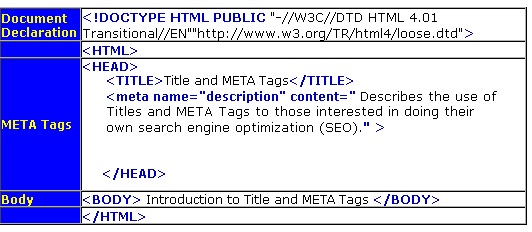
Although META tags were once an important tool in determining a sites ranking, their abuse by search engine optimizers, and website designers has diminished their effectiveness in that arena.
Even so, they are still useful for writing great descriptions, Titles, and adding GEO locator tags for location information. These are still recognized by some major search engines.
Today, there are only a few META tags that are worth your optimizing or using. Luckily, the list is short:
- Title
- Description
- GEO Meta Tags
- Robots
The Title Tag
Title belongs in the HEAD section between an opening and closing Title Tag, like so:
<TITLE>This is My Title</TITLE>
A search-engine friendly Title will follow three rules:
- The Title should be less than 70 characters in length. W3C reference
- A Title should be informative about the web pages content. It should be understandable outside of context. For example, “Introduction” is not a good page Title, but “Introduction to Search Engines” is a good Title. Important: The Title of a page appears as the link to your site in search engine results. Make it something your customers will be likely to click on!
- You should use your most important keyword towards the beginning. Don’t repeat keywords. That is, a Title such as “Optimization for Websites, Optimization for Search Engines, Optimization for Good Ranking,” could be considered over-optimization by a search engine. A Title such as “SEO Optimization – Search Engine Marketing by Your Company Name Here” is informative, has your brand and is appropriately keyword-rich.
Of all elements in the HEAD section, the Title is the most important and is the only one still routinely used by almost all search engines.
Description Tags
The description is another important element of the HEAD section. The Meta description is sometimes used as the description under your clickable-link in search results. A good description can mean the difference between someone clicking through to your site or skipping down to your next competitor.
The description belongs inside of a Meta tag with the following syntax:
<meta name="description" content="This is Where I write My Eye-Catching Description.">
It doesn’t hurt to throw a few keywords into the description, but write your description with the consumer in mind. Try to limit your description to 150 characters. So, the best description is a concise summary of your web page written in just one or short sentences.
GEO Meta Tags
GEO meta name tags serve as geographic identifiers for pictures, videos, and websites.
Geo tags normally include
- geo.position meta tag that includes Latitude, Longitude coordinates.
- geo.placename tag includes the position (city, state, county)
- geo.region tag includes a 2 character country code identifier and a 2 character state code identifier
GEO Tag Example
<meta name =”geo.position” content=” 29.760796;-95.606149 “>
<meta name =”geo.placename” content=” Houston, Texas, United States “>
<meta name =”geo.region” content=” US-TX “>
The Robots Meta Tag
A robots Meta tag is meant to instruct search engine spiders or ‘bots’ in how to index–or not to index–your site. The default is "index, follow", which means that without a robots META tag, the search engine spiders should assume you want them to index your site and follow its links.
The robots tag has several different attributes: index, follow, noindex, nofollow, all and none. With the noindex, nofollow, index and follow tags there are four possible combinations:
<meta name="robots" content="index, follow">
<meta name="robots" content="noindex,follow">
<meta name="robots" content="index, nofollow">
<meta name="robots" content="noindex, nofollow">
www.robotstxt.org describes their usage as follows:
INDEX means that robots are welcome to include this page in search services. FOLLOW means that robots are welcome to follow links from this page to find other pages. So a value of "NOINDEX" allows the subsidiary links to be explored, even though the page is not indexed. A value of "NOFOLLOW" allows the page to be indexed, but no links from the page are explored. This may be useful if the page is a free entry point into pay-per-view content, for example.
If you use only one attribute such as "noindex", the search engine will assume that the second attribute was at its default value, "follow".
The "all" and "none" tags are meant to be used alone as follows:
<meta name="robots" content="all">
<meta name="robots" content="none">
Using "all" is identical to "index, follow". "None" is identical to "noindex, nofollow", and tells the search engines to ignore the web page.
To prevent all search engines from using the Dmoz.org information for your sites Title and Description, use can the following Meta tag:
To prevent Google from using the Dmoz.org information for your sites Title and Description, use can the following Meta tag:
The robots tag is accepted by most all search engines. However, a robots.txt file is the preferred standard. Although neither one will ensure that search engines will index your site, it can’t hurt to have both. Think of them as search-engine welcome-mats.
For More on META Tags see the following article on Advanced META Tags


